
Kaidee
Re-designing the selling flow for Android users
Problem
Kaidee’s users love to sell items on our platform, whether they are secondhand or brand new. However, we noticed a drop off in users after onboarding. Users join the app with the intention to sell but exit halfway without completing their post.

Our goal
Our design goal was to uncover the causes behind user drop off and re-design a better flow to improve the selling experience.
Why is this project important❗️
-
My first experience with UX research and design. This project was my introduction to the design process.
Research
When I joined Kaidee, the CX design team has already spent weeks interviewing sellers to understand their journey, needs, and pain points. I came in to analyze data and created personas and customer journey maps to define our sellers.


From the interviews, we clustered our data and identified 8 pain points about Kaidee’s selling flow.
There were many reasons why customers were dissatisfied with the selling flow, but the top 3 issues which stood out were:
-
Uncertainty about item description. Users were unsure which title, price, and category to give their items. It felt de-motivating to do the research to complete a post.
-
Difficult categorization. Users were confused with our category options and had a difficult time looking for item category.
-
Mistakes made after posting. There was no way to review the information before posting. Users only see mistakes after the item is posted.

Our Design
Product name suggestions. We provided users with product name suggestions as clickable buttons below the input box. We recommended names and descriptions based on similar items that were sold in our database.

Price suggestions. We help users research the appropriate selling price by calculating the lowest, average, and highest prices for similar items, based on other Kaidee users.

Preview screen. Before completing the post, users can preview their information in case they wish to make any edits. This reduces backtracking and ensure that the item info is correct.

Usability Testing
We conducted usability tests to validate our design with our functional prototype. We gave users tasks to complete and ask them to walk through the process with the ‘think aloud’ method:
- Can you fill in the item title without typing?
-
Can you select the highest price for this item based on other sellers on Kaidee?
-
Can you find the appropriate category of this toy figurine?
-
What do you think is the purpose of the preview page?
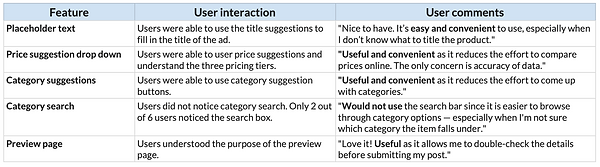
Overall, users were satisfied with the re-design and stated that they will most likely use Kaidee’s newer app in order to complete their future postings.
Key Takeaways
I felt tremendously fortunate to be a part of the Kaidee UX team — especially since I came in with limited experience in user-experience design. And despite all the hardships and challenges, I am very proud with what the team has achieved.
This project not only taught me the skills to become an innovative, keen-eyed designer, but to trust myself in taking the leap to challenge preconceptions and invent something new.
It was hard work, but we solved it!